Sunday, March 25, 2018

End of Marking Period 3 Blog Post

End of Marking Period 3 Blog Post

Geesh, has another marking period gone by already?! All I can say is that the amount of progress that have made on Ninjio is staggering. I have gone from ideas of what I wanted Ninjio's demo to play, look, and feel like to a nearly completed demo for the game. In doing so, I have been able to successfully split up Ninjio's overall demo into several smaller sections. Each of these sections are at points in the demo's overall story and action where I feel that if the player was left with any of these particular sections that they would have a good understanding of Ninjio's story and game play. Without further ado, I present to you the three sections of Ninjio's demo. I will intentionally keep the story and action as vague as I can, as I feel that I would be hard to "briefly" explain all the action going on at a given time. 

Section 1: Huai Ren boss fight

The arena from the player's point of view
An overview of the boss fight arena
This section of the demo was a pretty much guaranteed section that I wanted within Ninjio's demo. This section is where the player is introduced to the attitudes of three of Ninjio's main characters and the main villain throughout Ninijo's overall story. This section takes place during a boss fight, actually a mid game boss fight, with Huai Ren. The trio, as I call them, consisting of Yuan Shi, the team leader, Bao Lei, the savagely programmed robot, and the character that the player controls throughout the game, Kuai Long are tasked to invade Huai Ren's headquarters only to find that Huai Ren has a much more evil intent that simply ruling his city, he wants to take over the world. The trio then is charged headfirst into an hectic fight between Huai Ren and his army of robotic minions. This section contains two cut scenes, one before the fight to setup the characters and to showcase Huai Ren's evil intent and one after the fight to bring closure to the boss fight.
The arena from the stage


Section 1's art assets

Below are some of the art assets used during the boss fight, including many scenery items for the boss fight arena itself. These include benches, rocks, and a stage on which Huai Ren appears on briefly.

The hallway from above, note that the sides of the
hallway facing the camera here have been removed

Section 2: The Long Hall

This section is named after the original intent of this section of the demo. Originally this section was just suppose to be a scene in which the player gets to know an interesting part of Bao Lei's character. This section was meant to be an in-game dialogue chat between the trio, but it slowly morphed into a fun section of action that is now a cool down period for the boss fight that comes before the section. Originally this section was just to be a long hallway, hence the nickname, to allow for a section of dialogue to be played, but now it is, in addition to the dialogue section, a hallway with some twists and turns and some enemies for the player to defeat.


Section 2's art assets

Below are some of the art assets scattered throughout the hallway, including obstacles like boxes, boxes, and boxes (because boxes are a level designer's best friend).

Section 3: Michael Bay Ending

So this section is the very last section that players encounter before the demo ends, and boy did I want it to end with a bang (hence the nickname of this section). This section contains the rest of the group, Bing Nu and Ji Xie, meeting back up with the trio. Before the big boss fight, Bing Nu and Ji Xie split from the group to plant explosive charges in the maintenance area of Huai Ren's headquarters. In this section, the trio and the duo (Ji Xie and Bing Nu) as found together again. The duo are found, in a cut scene, to be trailed by several dozen of Huai Ren's robotic minions. The player is then tasked to dispatch all of them before continuing onto the last and final cut scene of the demo. The final cut scene consists of the team realizing that they cannot exit Huai Ren's elaborate headquarters, so Ji Xie suggest that they get off of the place using his new grappling hook. The demo is then ended off with an image of the team gliding away from the exploded building, with fireballs lining the background of the shot.


Section 3's art assets

Below are some of the art assets that were made for the final section of the demo. In order to save time, I reused the rocks and the ground that I made for the boss fight arena in this scene (asset re-usability at it's finest). 

Miscellaneous assets

Character portraits

These are used during dialogue to denote who is talking.


Police Bot Drone

This is the only enemy that I have made for the demo, but I do have ideas for more.

Whats next?

Whats next for Ninjio is for me to finish up the final cut scene, the one where the characters glide off of the building while it is exploding. Other than that, the demo is just about complete. I will need to start working on some things that would help during the demo for players, which includes things like a survey (so I can gauge the reaction that people have of the game), and a quicker way of restarting the game so that the next person in line can start the game with a clean slate. Another thing that I would like to work on for the game is some sort of area before the boss fight for players to get to know the characters and to help the player understand the controls of the game before I shove them headfirst in an, admittedly, challenging boss fight.

VOID

Void is my own little side game that I have been working, I will be making a blog post on here soon about the game itself, but I just want to leave you guys with some awesome footage of the game featuring a highly atmospheric song by one of my favorite music artists.

This week's work log:

Monday March 19th: Model and textured some surrounding buildings for the Fountain Scene.
Tuesday March 20th: Started prep work for the Fountain’s cutscene
Wednesday March 21st: No school, worked a little bit at home on the fountain cutscene.
Thursday March 22nd: Worked on the Fountain’s cutscene
Friday March 23rd: Started work on the Fountain’s final cutscene.

Saturday, March 17, 2018

The Art of The Play Test

Disclaimer:

Most of the projects that I will be doing are for a game that I am developing on my own code named Project Ninjio. In short, the game is a story action driven role playing game (common referred to as an action RPG). It features 2 uniquely styled areas, one in which the cities are built to flow along with nature, and the other where the cites are hyper futuristic. The game is set in a futuristic China, where after a large war, the country is split into the two settings described above. The game is built in the Unity 3D game engine.

The Art of The Play Test

What is play test?

So I have recently given a few of my friends the opportunity to playtest Ninjio and another project that I have been working on. A playtest is a good opportunity to allow outsiders, in my case anyone but me, to play the game while it is under development. The playtest allows solo creators like me to gain valuable feedback on the game and allow for some excellent suggestions for changes and features. Although I would like to list all of the changes and suggestions that I got from my friends during their playtests of both things, I feel that listing all of them would not make sense to anyone who hasn't played Ninjio or my other project before. However, I am more than willing to list the things that I have learned about how to properly carry out a good and productive playtest.

What makes a productive playtest

Related image
A good look at how a developer can use playtests
to get feedback from gamers
Ill be honest, most of my playtesting sessions are very casual in nature. Most of the time I will ask my friends, or anyone who I think would like to play the game, if they would want to playtest the latest build of my game. I think that this very casual nature of my play test results in some very good and truthful suggestions and reactions to the game, although I always come in with some sort of questions to ask for people.

I remember one time when I was watching someone play through Ninjio's boss fight and realizing that the person did not switch weapons that they used, using the low damage output shuriken attacks instead of going back and forth between the melee and shuriken attacks as the situation called for it. I asked them if they even knew that they could do that, and the did not know that you could. I then asked them how I could encourage the use of all the attacks and the person suggested that I make the default weapon that the game start you on to be the high damage, but high cooldown, melee attack. I made this change and then asked another person, who hasn't played the game till then to play it. To my suprise, they ended up pressing as many buttons as they could (even ones that closed out of the game!) to see if there was another weapon they could use.

It is the simple process of seeing an issue, asking questions, and listening that makes playtests so vital for all game developers.

This week's work log:

Monday March 12th: Finished texturing all objects in the Long Hallway scene
Tuesday March 13th: Redid the character portraits and added Bing Nu and Ji Xie to the dialogue character system.
Wednesday March 14th: Made a fountain for the new section of game codenamed the Fountain Scene.
Thursday March 15th: Continued working on the fountain for the Fountain Scene.
Friday March 16th: Started texturing the fountain for the Fountain Scene.

----- ----. ----. ----. ----- ----. ----- -----     ----- ----- ----. ----- ----. ----. ----. -----     ----. ----- ----- ----. ----- ----. ----. -----     ----- ----- ----- ----- ----- ----. ----- -----     ----- ----- ----. ----. ----- ----. ----. -----     ----- ----- ----. ----. ----- ----. ----. -----     ----. ----- ----- ----. ----- ----. ----. -----     ----- ----. ----. ----- ----- ----- ----. -----     ----- ----- ----- ----- ----- ----. ----- -----     ----. ----. ----. ----. ----. ----. ----- -----     ----- ----- ----. ----- ----- ----. ----. -----     ----. ----- ----- ----. ----- ----. ----. -----     ----. ----. ----. ----. ----- ----. ----. -----     ----- ----. ----. ----- ----. ----- ----. -----     ----- ----- ----- ----- ----- ----. ----- -----     ----. ----- ----. ----- ----- ----. ----. -----     ----- ----- ----- ----. ----- ----. ----. -----     ----- ----- ----. ----- ----. ----. ----. -----     ----- ----- ----- ----- ----- ----. ----- -----     ----- ----- ----. ----. ----- ----. ----. -----     ----. ----- ----. ----- ----- ----. ----. -----     ----. ----- ----. ----- ----- ----. ----. -----     ----- ----. ----. ----- ----- ----. ----. -----     ----- ----- ----- ----- ----- ----. ----- -----     ----. ----- ----. ----- ----. ----. ----. -----     ----. ----. ----. ----. ----- ----. ----. -----     ----. ----- ----- ----. ----. ----. ----. -----     ----- ----- ----- ----- ----- ----. ----- -----     ----. ----. ----. ----. ----- ----. ----. -----     ----- ----- ----. ----- ----- ----- ----. -----

Saturday, March 10, 2018

The Animation of Ninjio

Disclaimer:

Most of the projects that I will be doing are for a game that I am developing on my own code named Project Ninjio. In short, the game is a story action driven role playing game (common referred to as an action RPG). It features 2 uniquely styled areas, one in which the cities are built to flow along with nature, and the other where the cites are hyper futuristic. The game is set in a futuristic China, where after a large war, the country is split into the two settings described above. The game is built in the Unity 3D game engine.

The Animation of Ninjio

Introduction

Ninjio's art style allows for an interesting mix of cartoon-ish and realistic looks. The models themselves are fairly realistic, only cutting back a little bit to insure smooth game play on a variety of devices. The lighting in Ninjio though allows for me to easily bring in a bit of cartoon-ish look to the model. This then leads me with only one other thing that I need for the models to truly come to life (I mean, who wants a t-posed character to come at you anyways?), that being animation for the characters. 

Types of animation styles

Image result for smear frame sequence
Example of smear frames put together in a normal animation
Primarily in video games, you see two types of animation styles, cartoon-ish and realistic. Both of these types of animation styles are also seen in animation films, with each of them working well in both 3D and 2D games and films.
In a cartoon-ish style the bodies of characters and any rigid object are flexible. This means that when animating a sliding animation for example, the body of the character may grow and stretch horizontally to exaggerate the movement. This example is what is known as a smear frame, or a quick frame or two where the reality and constraints of an object or part of the body are temporarily ignored. That means that the animators can squash and stretch out the characters and object as much as they want to empathize movement or to add more charm to a certain action.

For more information about squash and stretch in video games, you can check out this video done by Extra Credits about how it is used in video game animation.
 
In a more realistic style of animation, the idea of squash and stretch goes out the window. Typically this means that the animations are more or less Void of the charm that they would had have otherwise, but in exchange the actions have a chance to look slightly more like what they would be in real life.

Animation within Ninjio

Because I want Ninjio to have a ton of charm, I am planning on using a cartoon-ish style of animation, complete with squashing and stretching of limbs and whatnot, the game. I have, however found that animating with squash and stretch in mind is kinda hard, you have to completely know how both the action looks in real life. You also need to known how you can use your animation's rigging to it's fullest potential in order to achieve a fine balance of realism and empathize on the motions that you want.

This week's work log:

Monday March 5th: Worked on the second major cutscene.
Tuesday March 6th: Started to block out the second phase of the game, the Long Hall.
Wednesday March 7th: Model the long hall scene.
Thursday March 8th: Modeled a few props that are to be used to further detail the long hall scene.
Friday March 9th: Did a bit of level designing on the Long Hallway scene.

Saturday, March 3, 2018

The Cinematic Elements of Ninjio: The Gear Dialogue System

Disclaimer:

Most of the projects that I will be doing are for a game that I am developing on my own code named Project Ninjio. In short, the game is a story action driven role playing game (common referred to as an action RPG). It features 2 uniquely styled areas, one in which the cities are built to flow along with nature, and the other where the cites are hyper futuristic. The game is set in a futuristic China, where after a large war, the country is split into the two settings described above. The game is built in the Unity 3D game engine.

The Cinematic Elements of Ninjio: The Gear Dialogue System

The dialogues as seen in game!

Introduction

Ninjio's story is mostly told through cinematic elements like in-game cut scenes and dialogue events. These elements are custom made by myself to ensure a very enjoyable experience. If you take a look at the story for the demo that I released 2 weeks back, you can easily see that within the 9 pages worth of story, almost all of the story that is told during the demo is told via dialogue between the characters with only a few portions being open for the player to interact with themselves. In order to deal with the massive amounts of dialogue that Ninjio as a whole has, I have written a custom script that allows for me to easily edit and add dialogue inside the Unity game engine that I have dubbed the Gear Dialogue System. My system, in combination with the fairly new addition of the Unity Timeline editor, has allowed me to write and direct the cut scenes, dialogue, and anything else that moves with relative ease. 


Gear Dialogue System (GDS)

What I work with to create
a piece of dialogue
The Gear Dialogue System allows me to quickly create and develop cutscenes for Ninjio. The system itself took around a month of time to properly develop and perfect. The GDS allows for me to type in dialogue (usaly copied directly from the demo's story document) for a character to say, have any actions such as loading a level or playing a sound effect after a the line of dialogue is said, specificy how long (if at all) the line of dialogue should be held for after being displayed, specify if the characters should be able to freely move around during the dialogue, and (most importantly) who is saying the lines of dialogue.
Each character, during a dialogue interaction, has not only their Pinyin name (like Huai Ren), but also their English name and Chinese name (Bad Guy and 坏人 respectively). The Chinese and Pinyin names are shown by default to the player, but just because a few people may be curious, I added the ability to hover over the Pinyin name of the character in English. The whole character name thing is all something that I wanted people to use in order to learn the names of the characters, even though they are in a different language.
The GDS, in tandem with the preexisting Unity Timeline editor, more information here, allows for the rapid development of Ninijo's story.


This week's work log:

Monday February 26th:Worked on the first cutscene
Tuesday February 27th: Worked on particle effect that are to happen during the first cutscene
Wednesday February 28th: Computer died, but still was able to sketch a police bot on ye olde pencil and paper.
Thursday March 1st: Did some more work on the UI.

Friday March 2nd: Finalized the last, I hope, UI element.
... .... . .-.. .-..     -.-. --- .-. .--. ... . ·----· ...     .-     .. -. ... .. -.. .     .-. .. --- -     --- .-.     .... . .-.. .-..     --- ..-.     .... --- ..- -. -.. ...     - .... .     ..-. .- -.-. .     .- -. -..     ... - .- -. -..     -- ..- ... -     -.. --- .-- -.     --. . - - .. -. --.     --- ..-.     ... --- ..- .-..     - .... .     .-- .. - .... --- ..- -     ..-. --- ..- -. -..     -... .     ... .... .- .-.. .-..     .-- .... --- ... --- . ...- . .-.     .- -. -..     -. . .. --. .... -... --- .-. .... --- --- -.. ...     -.-- ·----· .- .-.. .-..     - . .-. .-. --- .-. .. --.. .     - ---     -... .-.. --- --- -..     --- ..-.     ... . .- .-. -.-. ....     .. -.     -.-. .-. .- .-- .-.. .. -. --.     -.-. .-. . .- - ..- .-. . ...     .... .- -. -..     .- -     -.-. .-.. --- ... .     .. ...     .... --- ..- .-.     -- .. -.. -. .. --. .... -     - .... .     .-.. .- -. -..     - .... .     .- -.-. .-. --- ... ...     ..-. .- .-.. .-.. ...     -.. .- .-. -.- -. . ... ...

Saturday, February 24, 2018

The Cut Content of Ninjio's First Public Demo

Disclaimer:

Most of the projects that I will be doing are for a game that I am developing on my own code named Project Ninjio. In short, the game is a story action driven role playing game (common referred to as an action RPG). It features 2 uniquely styled areas, one in which the cities are built to flow along with nature, and the other where the cites are hyper futuristic. The game is set in a futuristic China, where after a large war, the country is split into the two settings described above. The game is built in the Unity 3D game engine.

The Cut Content of Ninjio's First Public Demo

Introduction

Last week I published a blog post outlining the story arch that player's will be experiencing during the demo that I am putting together for District Arts Festival. Although what you see there is a just a snippet of the overall story in the game, what you see in the document, found here, is a modified Scene #-Act # - Sub-line # format that I use within the script for showing where the content was meant to be, so I would encourage you to open the script in another tab so that you can easily travel back and forth between this blog post and the script.
version of a modified version of the original scenes. What I am saying is that there is a lot of content that I decided to remove for various reason, being demo limitations or something of that sort, from the demo itself! Being one who enjoys learning about cut content in video games, I have decided to give the details on what things I couldn't, for various reasons, include in the demo. Please note that I will be using the

Budget(?) Cuts?

  • Act 2 - Part 3 & Act 3- Part 1 - Sub-line 3
    • Entirely cut because starting a demo with a boring labyrinth of tunnels would be lame as heck, plus it served no story purpose other than being a cooling off moment from the previous scenes (which the demo will not include).
    • Replaced by a much easier to understand elevator ride in which the player can quickly get acclimated to the controls.
  • Act 3 - Part 1 - Sub-line 6J - 6Y & Act 4 - Part 1 - Sub-line 3F- 3G
    • Removed because it not only would slow down the pace of the demo, but I just don't want to have to model an entire audience and have them talk. 
    • I will try to do this in the full version of the game because I like the viva la revolution kind of vibe that it gives off. 
A far view of the stage

Other Cuts

So these are not listed using my odd Bold and Underlined Indicators but they will still be happening.
  • The boss fight with Huai Ren was originally broken into 4 main stages (Just Humanity Helpers, Humanity Helpers and charging Huai Ren, and 2 Huai Ren shooting stages). In order to keep the pacing and the length of the demo fast and small, I have decided that only the first two stages of the fight will happen in the demo.
    • I plan to include all 4 of them in the full version of the game.
    • This should also allow me to get to the last part of the game that I want to include in the game (Act 4 - Part 1).
  • The original location of the boss, as partially seen by Act 3 Part 1's section 2, was supposed to be an enclosed stage of some sort. I have changed the location to be outside so that I can experiment with more organic shapes instead of boxes and other things.

Screen Shots

  
Underneath the building is where the action takes place
A view looking at the stage
The view from the stage
The backside of the stage, doubt much action is going to happen here!

Other notes

I like humor. (Act 3- Part 2 - Sub-line 3C and the names of the parts for examples)

This week's work log:

Monday February 19th: No school, light reworking of the internal file hierarchy.
Tuesday February 20th: Finished Kuai Long's running animation.
Wednesday February 21st: Textured both the pedestal and drones for the Humanity Helpers, you can now be helped by our 4 star staff.
Thursday February 22nd: Made character portraits for the trio and Huai Ren for during dialog sections.
Friday February 23rd: Started working on cutscenes for Ninjio, first time using the new Unity Timeline editor… I like it

Sunday, February 18, 2018

The Story of Ninjio's First Public Demo

Disclaimer:

Most of the projects that I will be doing are for a game that I am developing on my own code named Project Ninjio. In short, the game is a story action driven role playing game (common referred to as an action RPG). It features 2 uniquely styled areas, one in which the cities are built to flow along with nature, and the other where the cites are hyper futuristic. The game is set in a futuristic China, where after a large war, the country is split into the two settings described above. The game is built in the Unity 3D game engine.

The Story of Ninjio's First Public Demo

The table of contents for Ninjio's Story
The part where the demo takes place is
shown with the black line... A bit much

Introduction

In all of my blog posts, I include a disclaimer that describes Ninjio and what I hope to achieve with it. One of the things that I highlight with the disclaimer is that the game is story based. Although I keep on saying that the game is story based, I have not shared much about that actual story elements that one will be experiencing within the first demo that I will have, the one that is going to be for the District Arts Festival at my school. 

Story Time!

So instead of just saying what elements of Ninjio's overall story will be included in the demo, I have extracted the dialouge and other things that I have in the overall script that will be included in the demo! Feel free to take a look through the script of the demo and use your imagination to help the scene, and the demo itself, come to life!

Special notes on how Gismo's brain works

Within the script, you will see many odd markings that were meant for only me to see. These include italicized sections, bold and underlined section. Hopefully the diagram below helps with explaining how these markings work.

Please keep in mind that the act and part names are just for me to know what is happening overall in that part of the game

If you want, you can press ctrl+alt+h or ctrl+alt+a to bring up the outline of the script to skip to various parts of the script!

This week's work log:

Monday February 12th: Started to texture the boss arena
Tuesday February 13th: Finished texturing most of the boss arena
Wednesday February 14th: Started working on the animations, first up is Huai Ren’s charging animation!
Thursday February 15th: Worked on the next animation, Huai Ren’s exhausted and reving up poses.

Friday February 16th: Started working on Kuai Long’s animations, first up is the idle and walk cycle

Sunday, February 11, 2018

The Art of the Future

Disclaimer

Most of the projects that I will be doing are for a game that I am developing on my own code named Project Ninjio. In short, the game is a story action driven role playing game (common referred to as an action RPG). It features 2 uniquely styled areas, one in which the cities are built to flow along with nature, and the other where the cites are hyper futuristic. The game is set in a futuristic China, where after a large war, the country is split into the two settings described above. The game is built in the Unity 3D game engine.

The Art of the Future

Introduction

I have already covered the main source of inspiration for the main setting, Jade Gate, in Ninjio in a previous post, however since I am now designing elements of the city, I thought it would be interesting to investigate how everyday items, like benches and cars, would look like in Jade Gate's highly futuristic setting. In this blog post, I will show you various concepts that other artists have done and explain why I feel that they will fit within Jade Gate's setting.

A Gallery of Inspiration


Seating
Image result for futuristic seatingImage result for futuristic seatingImage result for futuristic seating

These designs for seating and benches all share one thing in common, they all ebb and flow in a very calculated and technical manner. They would all fit with Jade Gate's highly technical being and nature while still being practical for people to actually sit on them. The last one, with the geometric design, I particularly like due to how the triangles, although flat and not curved, make up a larger wave-like pattern.

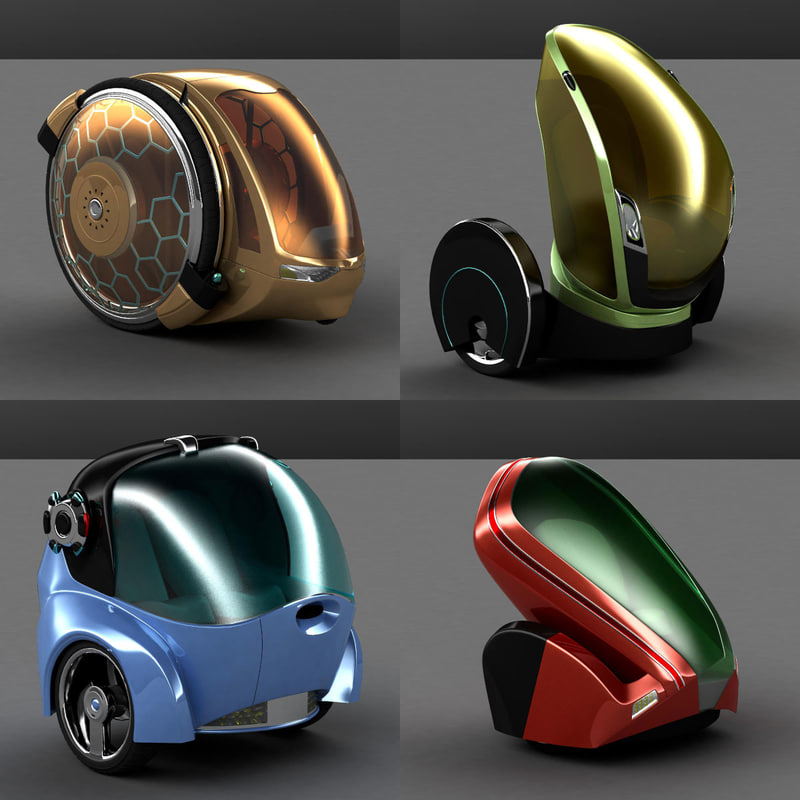
Single Person Transportation
Related imageRelated imageSo between these two designs, I like the one to the right(the 2 wheels) design the best because it emphasizes the speed and effective designs that Huai Ren, the leader of Jade Gate, would like for himself and his citizens.

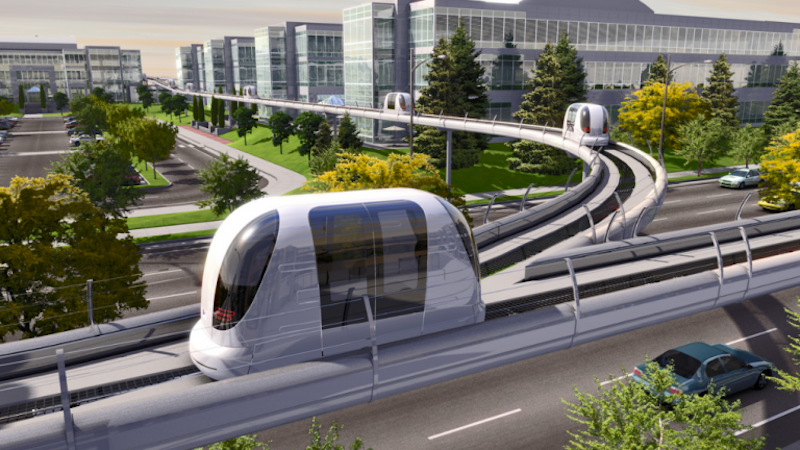
Mass Transit

Image result for transit of the futureNot going to lie here, I was almost tempted to add Elon Musk's Hyperloop concept into this, but I thought back to the original plans for Walt Disney's EPCOT city and realized that the transit system for the city was just like the People Mover found in both Walt Disney Land and World. As such, the design choice was simple, a single family transit system that is both fast, and look pretty dang cool. This would also tie into what Huai Ren would want for his city, a clean and effective mass transit option for his people.

Conclusion

So instead of going through every object that a city of today would have and telling you what I want it look like inside of Jade Gate's city of tomorrow, I will give you a mantra that I will go by when designing these objects: Simple, clean, effect, and mabeye a bit showy.

This week's work log:


Monday February 5th: Modeled the stage of the boss fight arena
Tuesday February 6th: Modeled one of the pieces of the boss fight arena
Wednesday February 7th: Snow Day, did some work at home though
Thursday February 8th: Remodeled the base of the boss fight arena
Friday February 9th: Finalized all the models for the boss fight arena